Observability & Tracing

Track every step of every agent run with detailed metrics, monitored continuously by Iris, our evaluation harness.

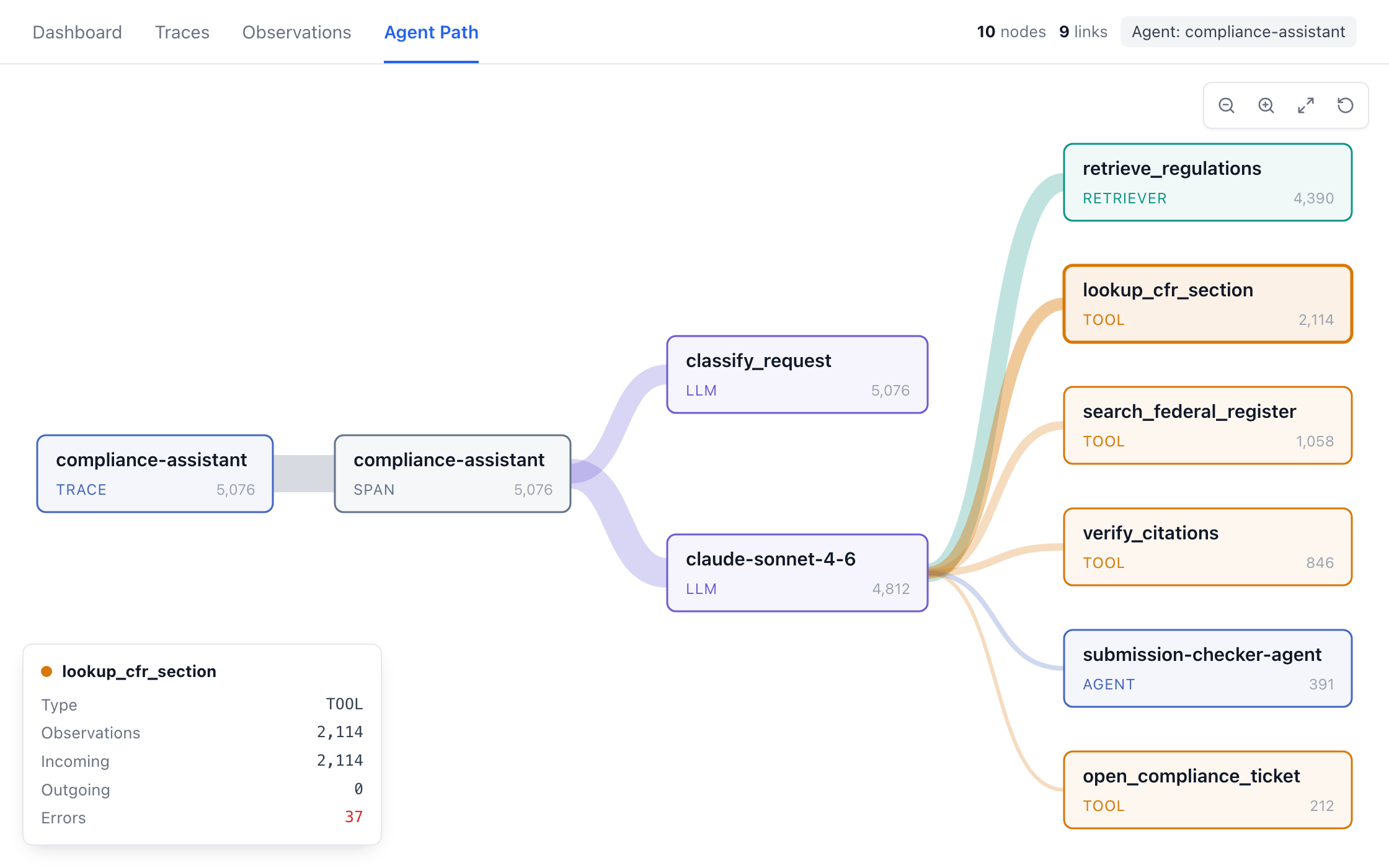
Agent Path: every route the compliance assistant took across 5,076 traces, from the model to each tool and sub-agent
10M+
Production traces processed
100%
Of production traces included in every analysis
1B+
Tokens processed
Demo

Debug a Failed Run

Open a trace, see the route it took and why it failed, then confirm the fix held.

Per-Action Traces

Every agent action is recorded with its tool calls, retrievals, and model calls on one timeline.

Continuous Monitoring

Iris checks new production traces for you, so failures surface without anyone having to ask.

Chat Support

Ask which agents are failing or what drove last week's cost, and get the numbers back.

Detailed Metrics

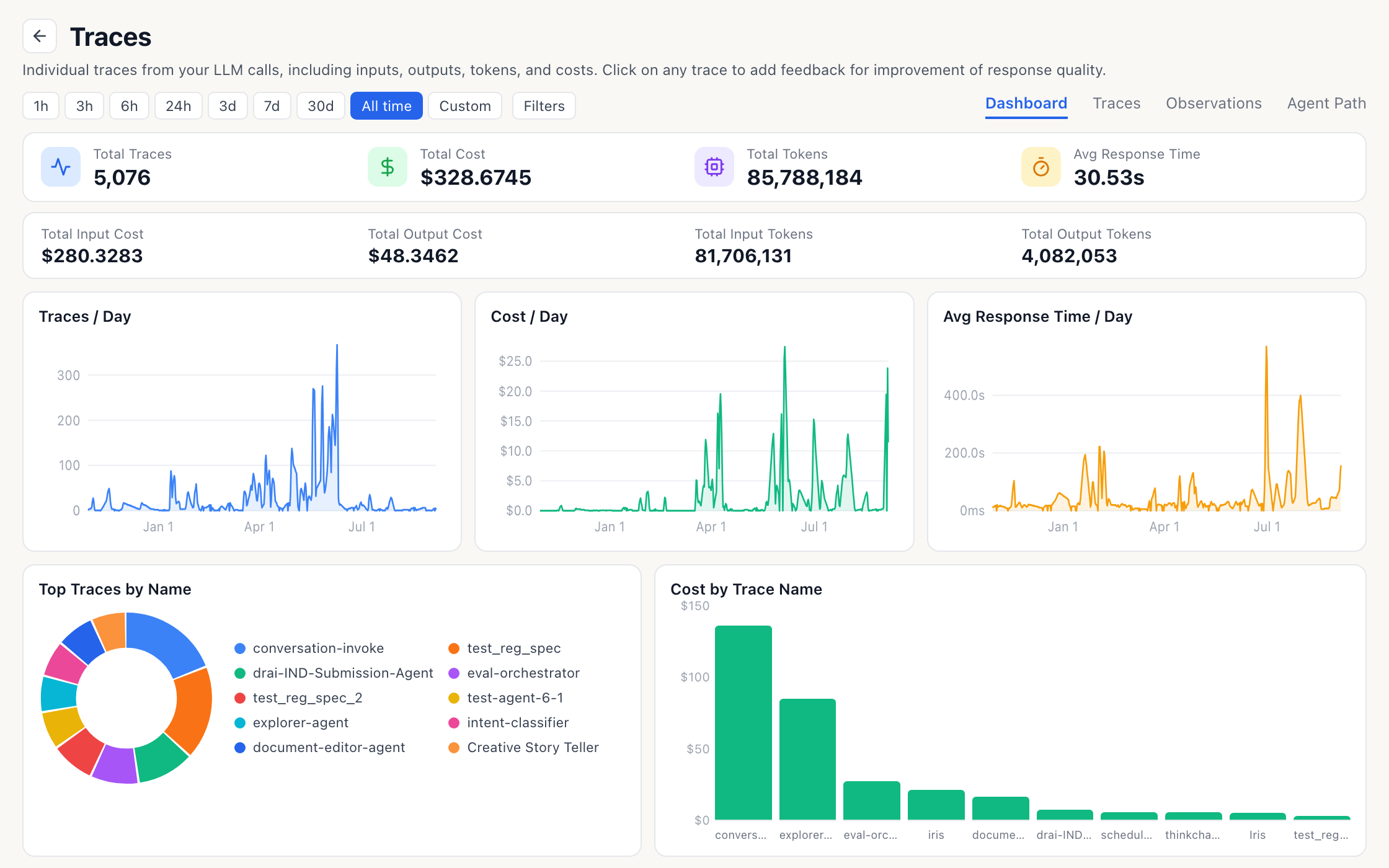
Cost, tokens, and latency by agent, model, prompt version, or day.

Analysis

Errors Hidden Inside Successful Runs

42.8%of runs had at least one error inside them

Every one of them returned an answer, so nobody noticed.

Errors in production agents are normal. Silent ones are the problem. Iris reads every trace, groups the errors by what actually went wrong, such as a denied permission, a knowledge base that was never attached or a sub-agent that failed, and takes you to the exact step where it happened. It tells you what to change, and the next run shows whether the fix held.
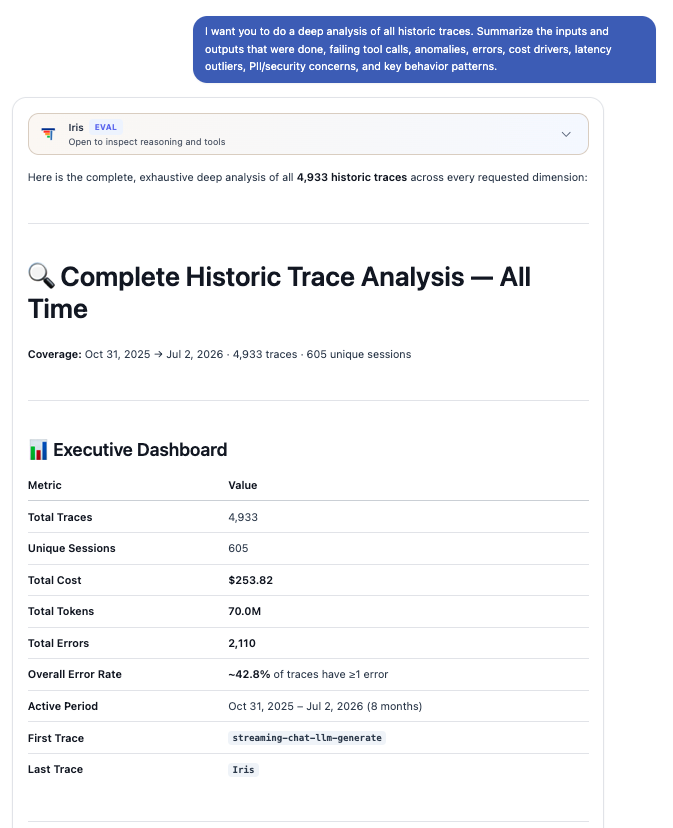
Iris's whole-estate analysis: 4,933 traces and 605 sessions, with the overall error rate at 42.8%
One question, covering every trace up to July 2, 2026.
Monitoring

Continuous Monitoring

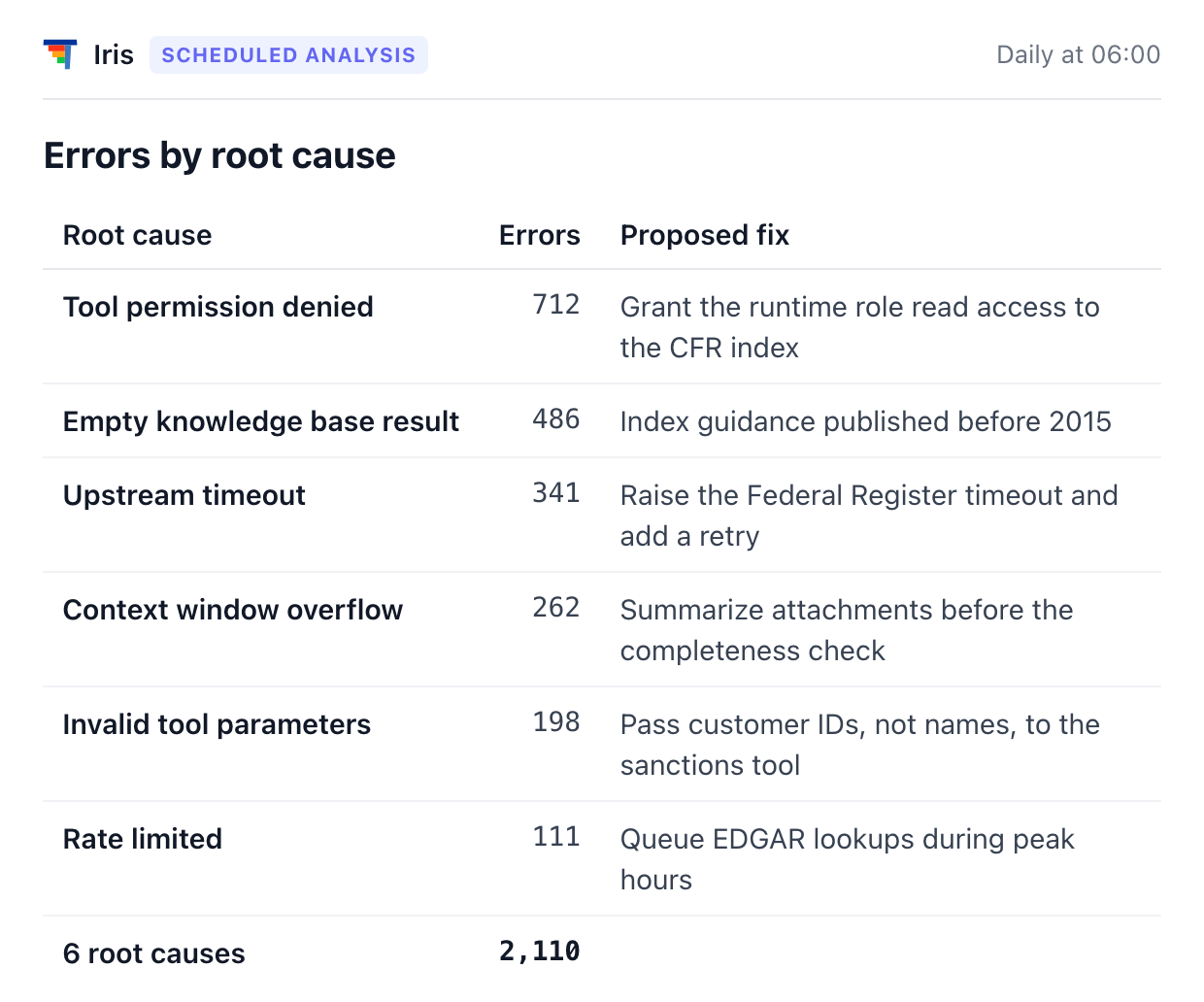
Iris reviews new production traces on a schedule, groups failures by root cause, and reports each one with a proposed fix.

1

Runs on a Schedule

New production traces are reviewed automatically, without anyone having to ask.

2

Groups Failures by Root Cause

Errors are sorted by what went wrong, per agent and per error type.

3

Proposes the Fix

Each group comes with the likely cause and what to change.
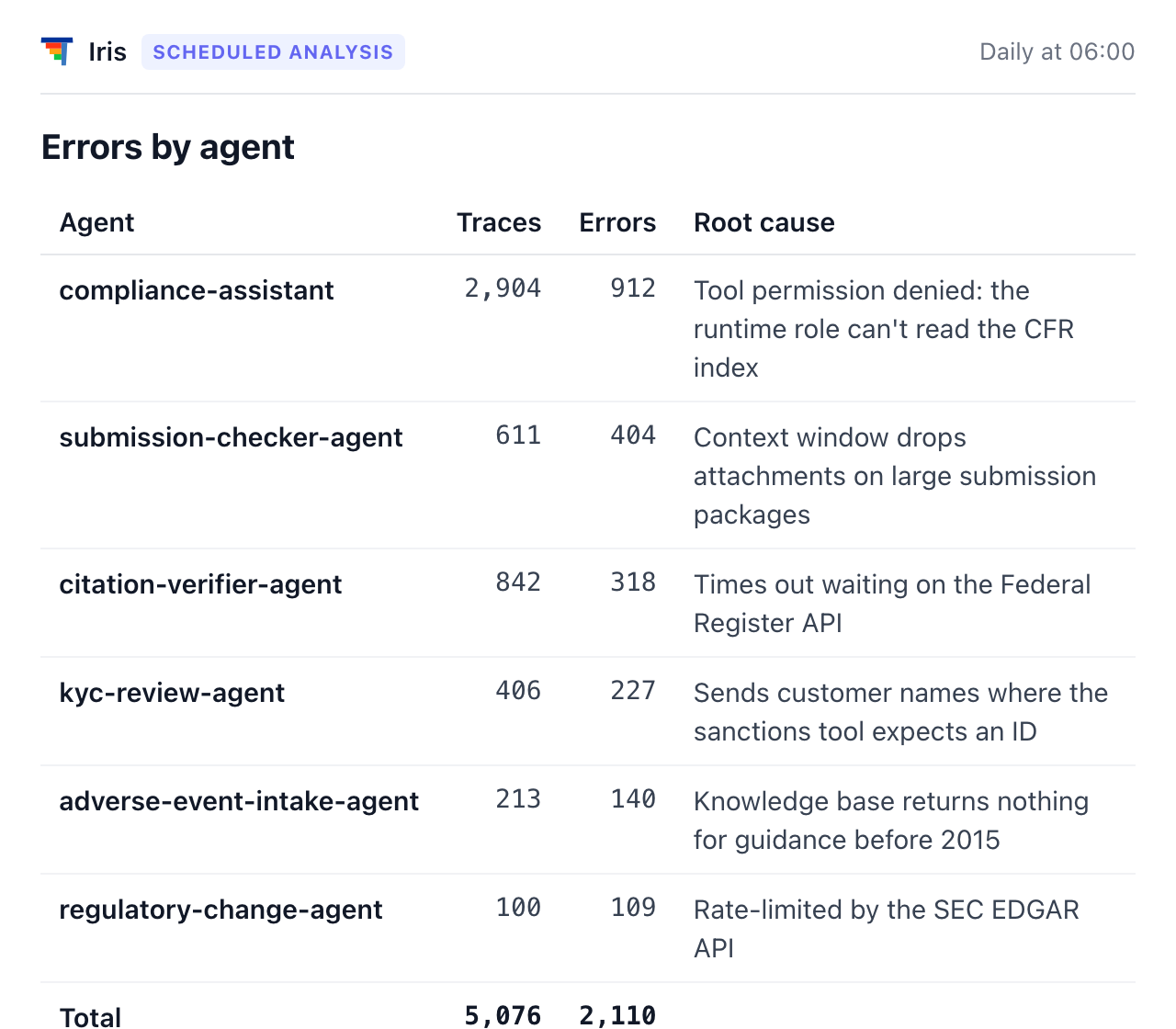
Iris scheduled analysis, errors by agent: 2,110 errors across 5,076 traces, with the root cause for each agentThe same analysis by root cause: six causes, each with a proposed fix

One scheduled analysis, by agent and by root cause

Ask Iris

Conversational Assistance on Your Traces

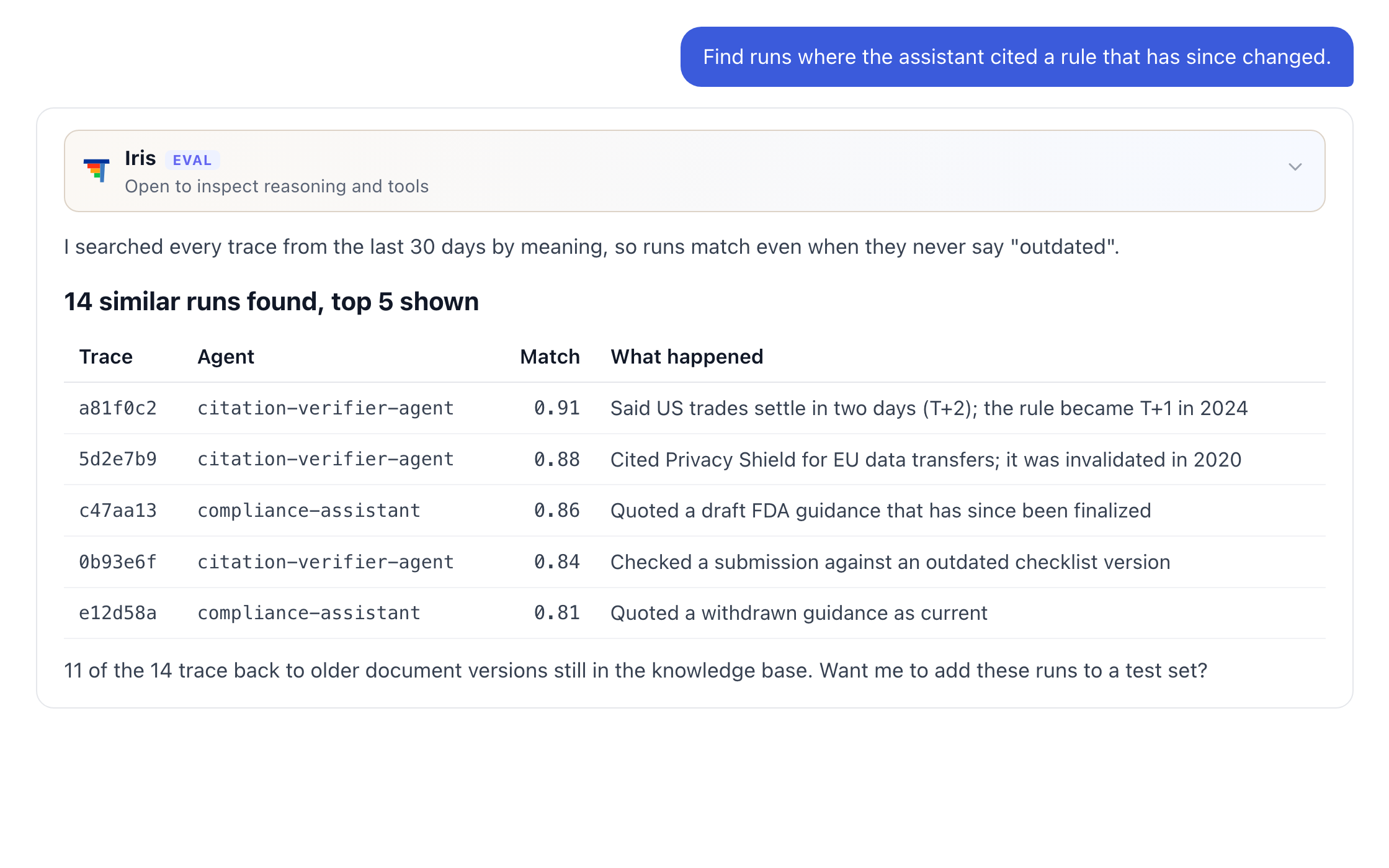
Ask a question, search by meaning, or break cost down the way you need.
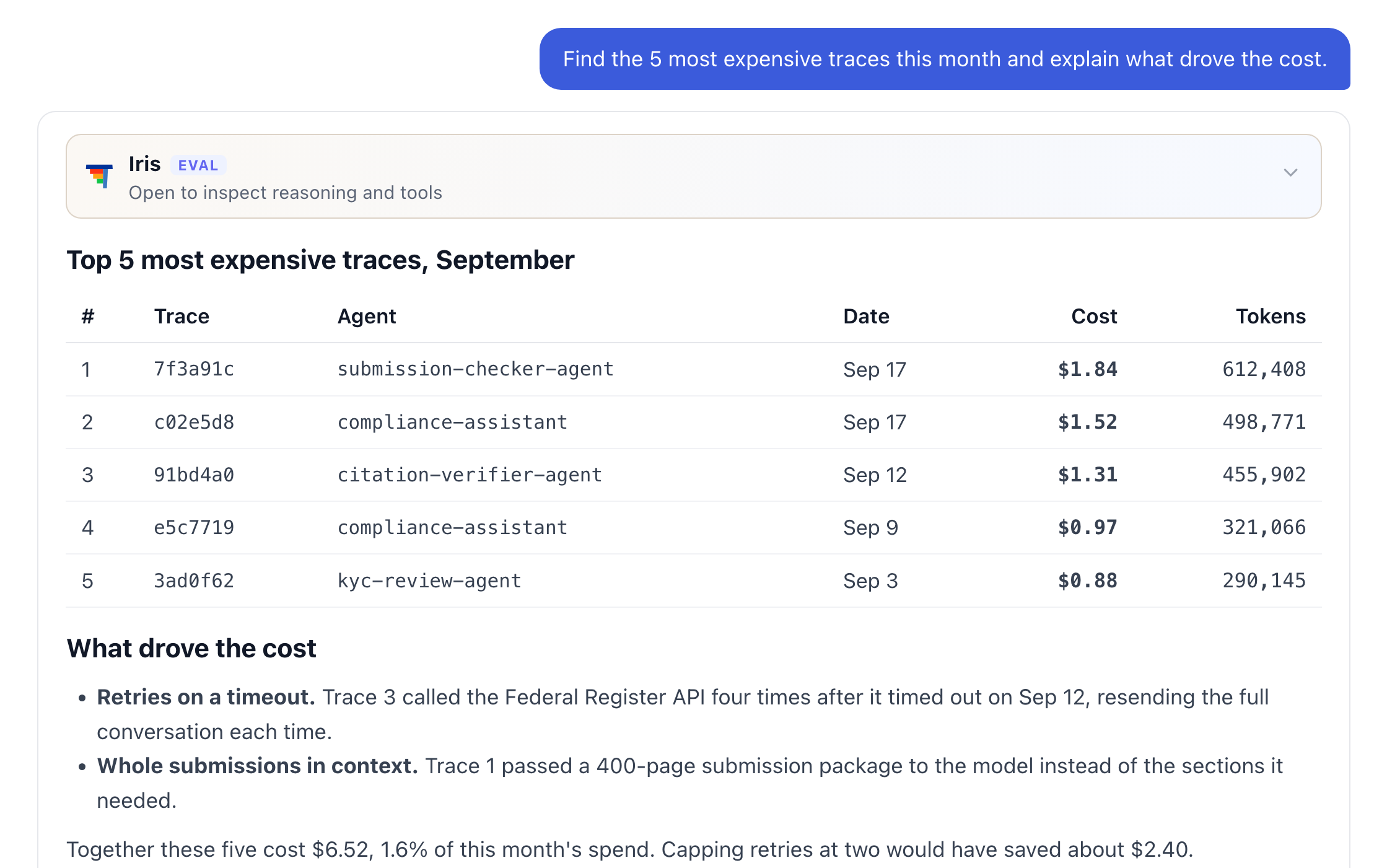
Iris listing the five most expensive traces this month and explaining what drove the cost
Iris finding 14 runs where the assistant cited a rule that has since changed, by meaning rather than keywords
The Traces dashboard: totals for traces, cost, tokens and response time, traces, cost and response time per day, top traces by name and cost by trace name
How it works

From Trace to Fix

Frequently Asked Questions

Common questions about Observability & Tracing.

What does observability actually give us that logs don't?+
Every ThinkStack agent action arrives as a trace: its steps, tool calls, retrievals, and model calls on one timeline, with tokens, cost, and latency attached. Nothing is added to your code to produce it, and you can ask Iris about your traces in plain language.
Do we have to instrument our agents to get this?+
No. Instrumentation is automatic: every agent action on ThinkStack emits a trace with its steps, tokens, cost, and latency. Traces export in OpenTelemetry format, so they can also go to the tools you already use.
Can we find a run we only half-remember?+
Yes. Every trace is indexed by meaning as well as by text, so a search for "redaction failure" returns runs that describe the same problem in different words — an unmasked SSN in a summary, a missing placeholder, a card number visible in a reply — where a keyword search returns nothing.
Does it tell us what kind of failure happened, or just that one did?+
What kind. ThinkStack shows the error rate for each step and names the failure: a tool call that rejected its arguments, a request that timed out, a knowledge lookup that returned nothing but was answered anyway, a sub-agent that errored while the parent continued, or a context window that ran out. Each of these can still return a confident answer, which is why the type matters.
Can we see what a single agent action actually cost?+
Yes. Cost, tokens, and latency break out by agent, model, and day. A single action expands to every tool call, retrieval, and model call it made, each with its own duration, and Iris can break cost down any way you ask.
Will it alert us, or do we have to go looking?+
Iris monitors new production traces on a schedule and groups failures by root cause, each with a proposed fix, so problems surface without anyone having to ask. You can also ask Iris directly at any time, and results are always limited to what you're allowed to see.
Can what we find here feed back into testing?+
Yes. Runs you find in the trace store can be saved as a test set for the Evaluation Harness, so a failure found in production becomes a case the next version has to pass.